
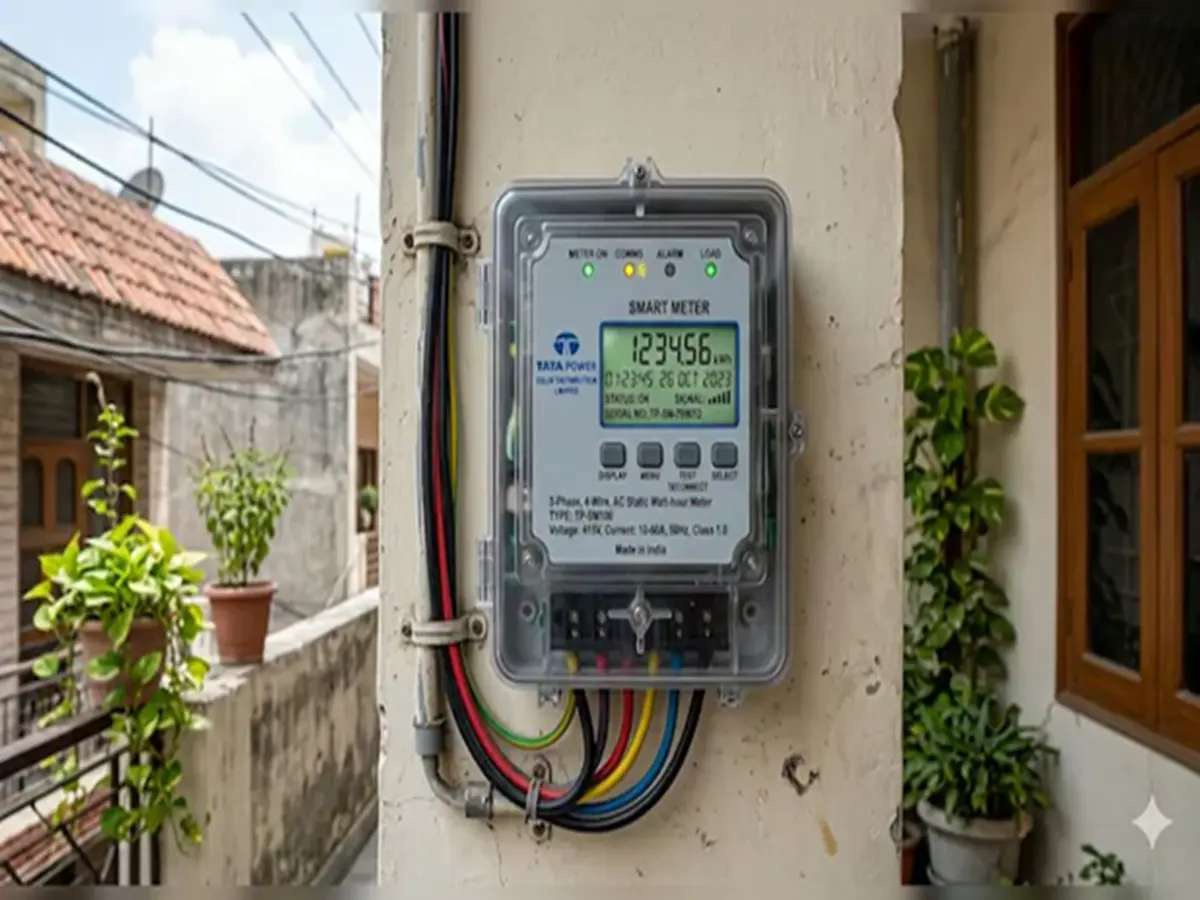
If you had a smart prepaid meter on your UPPCL electricity connection, your billing arrangement changed on May 6, 2026. UPPCL’s Managing Director issued a formal order directing all four distribution companies and KESCO Kanpur to switch every smart prepaid meter to postpaid mode immediately, through the central RMS backend system. Around 85 lakh smart meters were installed in Uttar Pradesh, of which nearly 83 lakh were prepaid, per UPPCL’s own figures. All have been converted, following the directions of Chief Minister Yogi Adityanath, per the official statement by Energy Minister A K Sharma on May 8, 2026.
For UPPCL consumers who pay their bills digitally, Bajaj Pay, the BBPS payments platform on Bajaj Finance, shows your exact bill amount before you pay and handles payments across all four UPPCL distribution companies with instant confirmation.
What changed and what did not
Only the billing mode changed. Your smart meter hardware is still installed, still recording actual consumption in real time, and still eliminating the estimated readings that old conventional meters relied on. Every unit on your postpaid bill now corresponds to a real transmitted reading, not an average.
What changed is the payment model. Instead of topping up in advance, you now consume electricity across the billing cycle and pay once a month. UPPCL Bills for electricity consumed in May 2026 are issued in June, and from July onward the monthly cycle runs continuously, per the official order.
Your new billing arrangement at a glance
Energy Minister A K Sharma’s official statement confirmed the following billing terms for all postpaid consumers:
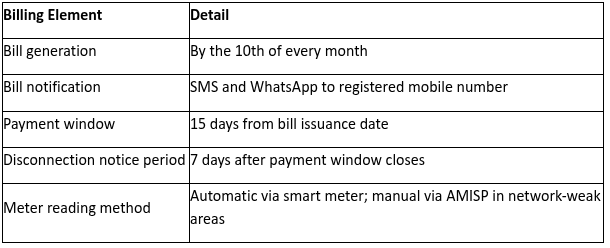
Missing the 15-day payment window does not trigger immediate disconnection, but it starts the late payment surcharge clock and begins the 7-day notice period. Paying on or before the due date keeps both off your account.
Security deposits and pending dues
Security deposits that were adjusted when consumers moved to prepaid mode are now being reimposed, in accordance with the Electricity Supply Code-2005 and Cost Data Book-2026. Recovery begins from bills generated in July 2026. Pending electricity dues up to April 30, 2026 can also be cleared in installments, depending on your consumer category.
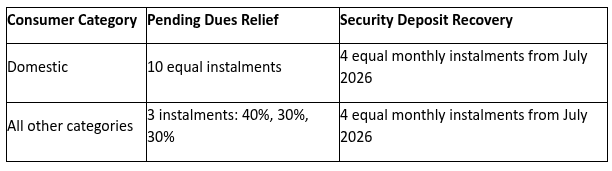
Both the deposit and pending dues amounts will appear as separate line items on your monthly bill alongside your regular consumption charge.
Checking your bill and raising a complaint
Before paying each month, a quick UPPCL bill check confirms the exact amount due, the billing period, units consumed, and any deposit instalment added to the current cycle. The amount shown on a certified UPPCL bill check platform is pulled directly from the discom’s live billing system, not a stored figure.
If you experienced billing irregularities during the prepaid period, special grievance redressal camps are running at Executive Engineer and Sub-Divisional Officer offices from May 15 to June 30, 2026, per the official statement. The 1912 helpline is also handling smart meter complaints during this period. Bring your consumer number and any previous prepaid recharge receipts when you visit or call.
To verify whether a previous payment or complaint has been reflected, check your UPPCL electricity bill status on a BBPS platform shows your current account position in real time before you take any further action.
Pay your UPPCL Bill on Bajaj Finance
Your bill arrives by the 10th of each month with a 15-day payment window. The Bajaj Finance platform processes UPPCL bill payments across PVVNL, MVVNL, DVVNL, PUVVNL, and KESCO Kanpur through BBPS.
Steps to pay on the app or website:
- Open the Bajaj Finance app or visit bajajfinserv.in and log in
- Go to Bills and Recharges and select Electricity
- Select your UPPCL distribution company and enter your consumer number
- Review the bill amount including any security deposit instalment before confirming
- Choose a payment method, complete the transaction, and save the receipt
Your smart meter is still on the wall and still working. The billing mode is now postpaid, bills arrive by the 10th each month, security deposits return in instalments from July, and grievance camps run through June 30. Keep your consumer number ready and use the 1912 helpline for anything that needs following up.
